Project Slayers 2: find your setting
The Project Slayers 2 settings in the official description are three. Mobile and console players can edit their Aim Assist sensitivity in settings. Mobile players can also toggle shift lock in the top right corner and change the size of their buttons in settings. The description had not changed when we read it again on , and we have not tested other options.
Last checked / Roblox listing updated 2026-09-21
Project Slayers 2 settings by device
Pick your device to see which lines of the official description apply to it. Two of the three are mobile settings; Aim Assist is the only one that also covers console.
On console, the official description only lists Aim Assist sensitivity. The shift lock and button size settings are listed for mobile only.
All 3 settings in the official description apply on mobile.
- Mobile
- Console
Aim Assist sensitivity
Edit how sensitive Aim Assist is.
Where: In the game's settings
The official description says:
Mobile and Console users can edit their Aim Assist sensitivity in settings.
- Mobile
Shift lock
Turn shift lock on or off.
Where: In the top right corner
The official description says:
Mobile Users can Toggle Shift lock in the top right corner
- Mobile
Button size
Make the on-screen buttons bigger or smaller.
Where: In the game's settings
The official description says:
Mobile users can change the size of their buttons in settings
The mobile settings and Aim Assist line, word for word
This is the whole description on the Slayers 2 page on Roblox. We read it on 2026-09-20 and again on 2026-09-22, and not a word had changed. We left out the emoji at the start of each line and put the devices in front instead: the first line starts with a phone and a game controller, the other two with a phone only.
Mobile + ConsoleMobile and Console users can edit their Aim Assist sensitivity in settings.
MobileMobile Users can Toggle Shift lock in the top right corner
MobileMobile users can change the size of their buttons in settings
The description names no menu, no default value and no range. It does not say whether Aim Assist can be switched off, which consoles it means, or what the top right corner belongs to. We have not opened the settings in the game, so this page does not fill those gaps.
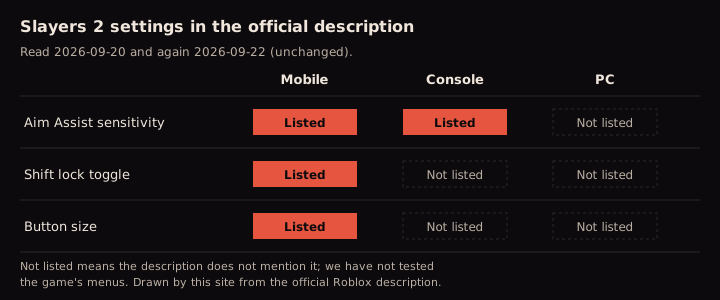
Aim Assist sensitivity, mobile and console
The only line written for both devices. It says players can edit how sensitive Aim Assist is, and that the option is in settings. It says nothing about Aim Assist on PC.
Shift lock, mobile only
Mobile users can toggle shift lock in the top right corner. It is one of the two mobile settings, the only one of the three given a position instead of a menu, and the description gives it no console or PC version.
Button size, mobile only
Mobile users can change the size of their buttons in settings, the second of the two mobile settings. The description does not say which buttons or how far they scale.
Slayers 2 controls on PC: the keyboard list is from Project Slayers 1
The description lists no Slayers 2 controls for keyboard and mouse. The first game's official description does: the Roblox listing called Project Slayers, place 5956785391, gives its default controls and three combos. If a guide hands you a keyboard layout for Slayers 2, compare it with this list first.
Old game
Project Slayers 1
Not this game.
Treat anything from it as unverified for Slayers 2 until it is checked in the new game.
From the description of Project Slayers, place 5956785391, read 2026-09-22.
Default controls
- Attack
- M1 (left click)
- Heavy attack
- M2 (right click)
- Open menu
- M
- Dash
- Q
- Wall climb
- CTRL
- Sprint
- Left Shift
- Mouse lock
- Left Alt
Combos
- Air combo
- LRLRL or Space
- Special combo
- RRLRL
- Special combo
- LLRLR
These are Project Slayers 1 controls from that game's own description, read on 2026-09-22. None of them has been checked in Slayers 2, so they are not Project Slayers 2 settings, even if some turn out to match.
How to check Project Slayers 2 settings yourself
Open the official game page, roblox.com/games/16205713724, and confirm that the creator line says By Ouw Productions. The description sits on that page. Compare its lines with the quote above and note the date you read it: we have found no official patch log for the listing, so a changed line may not be announced anywhere we can cite.

Then open the game on your device. The description points to two places: the game's settings for Aim Assist sensitivity and button size, and the top right corner for shift lock on mobile. If you find more options, or a line changes, send it with the form below and we will check it in Slayers 2.
Project Slayers 2 settings FAQ
Can I turn off Aim Assist in Slayers 2?
The description only says that mobile and console players can edit its sensitivity in settings. It does not say whether Aim Assist can be switched off, and we have not checked the menu.
Where is shift lock on mobile?
In the top right corner, according to the official description. It says nothing more about where the toggle sits.
Are there Slayers 2 settings for PC?
None are listed. The description covers mobile and console only and gives no Slayers 2 controls for keyboard and mouse; the keyboard list that gets quoted comes from the first game's description.
Can I change button size on console?
The description lists button size for mobile only. We have not checked the console menus.
Which mobile settings does Slayers 2 have?
Three, according to the description: Aim Assist sensitivity, a shift lock toggle in the top right corner and a button size setting.
Is there a graphics or sound setting in Slayers 2?
The description does not mention graphics, sound or anything else. We have not tested those options, so this page lists none.
Which route are you unsure is from Project Slayers 1?
Found a leveling route, a tip or a number and not sure it is from Slayers 2? Send it. What players ask about most is what we check in the game next, and if it turns out to come from the first game, it gets this mark:
Old game: Project Slayers 1, Not this gameEmail us the route. Your email app will open a draft for you to review and send.
Email your request